In today’s content-driven world, making engaging videos is a necessity, not an option. But let’s be honest—staring into a camera and trying to recall a perfectly worded script can feel awkward and unnatural. The secret to looking confident and making a genuine connection with your audience is simple: eye contact.
This is where a high-quality teleprompter comes in, and based on my personal experience, the Elgato Teleprompter is the game-changer you’ve been looking for. It’s the one piece of gear that immediately leveled up my video production, and here’s why I wholeheartedly recommend it.
The Elgato Advantage: Seamless and Simple Setup
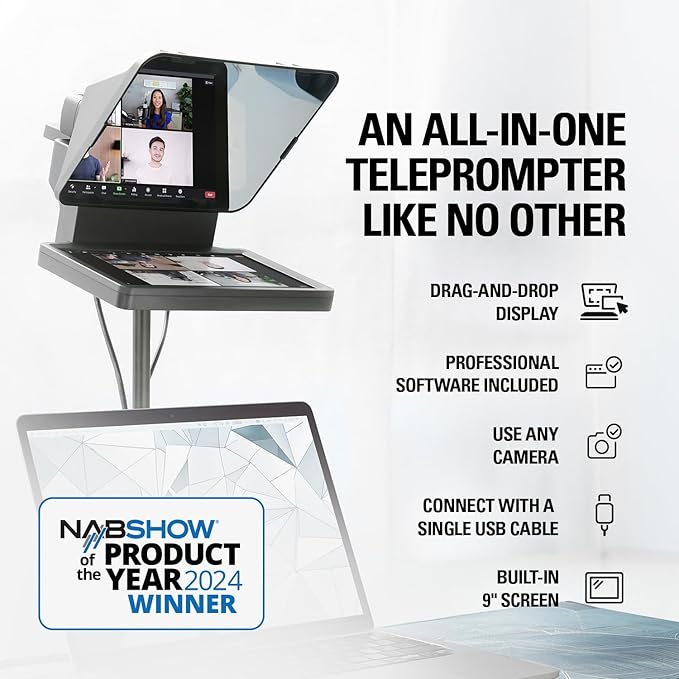
The Elgato Teleprompter is designed for the modern creator, offering an out-of-the-box experience that sets you up for success right away.
- Integrated Software: It comes bundled with excellent software, allowing you to easily control the scroll speed, text size, and flow of your script directly from your computer. No need to hunt for compatible third-party apps!
- The iPhone Winning Combo: One of its best features is the included mount for your iPhone. I use my iPhone for all my video recordings, and the way it sits perfectly in the mount, right behind the reflective glass, works incredibly well. It makes setup a breeze—plug and play with near-instant results.
- A Mac Creator’s Dream: As a MacBook Pro and iPhone user, I’ve found the seamless integration between the Elgato Teleprompter and the Apple ecosystem to be a major selling point. While I haven’t personally tested it with a PC, the smooth performance with my Mac devices suggests a winning combination for Apple users.
👋 Heads Up:
I have a mac set-up, and for me this thing is great. I can’t speak to the experience of PC users…but the reviews are really good for this product, so it must be good for them as well.
🛠️ My Real-World Setup and Pro-Tips
Every creator’s setup is unique, and a few key factors enhance the Elgato experience:
- Mounting Flexibility: I pair my Elgato Teleprompter with an extendable arm clamped to my desk. This allows for incredible flexibility in positioning the camera and teleprompter for the perfect shot, whether I’m sitting or standing.
- DSLR Compatibility (A Note on Weight): While I shoot on my iPhone and use this mount, I know creators who use the Elgato Teleprompter with their DSLRs and are very happy with the results. Just be aware: the weight of a larger camera and lens means your tripod or mounting arm will need to be sturdy and stable to handle the extra load.
🤝 The Confidence Loop: Teleprompter + Descript
Using a teleprompter gives you the confidence to look directly into the lens and deliver your script flawlessly. But what happens when you stumble? That’s where your editing tool comes in.
I use Descript (👈 use this link for a discount), a transcript-based video editing tool that completely removes the need for complex, traditional editing skills. You edit the video by simply editing the text of the transcript—like working in a Google Doc! It’s my favorite.
This combination creates a powerful confidence loop for content creation:
- Confidence to Shoot: The Elgato Teleprompter lets you shoot your script with perfect eye contact.
- Confidence to Edit: Descript lets you effortlessly edit out mistakes without needing advanced technical skills.
🚀 The Ultimate Script-to-Video Workflow
Ready to go from idea to professionally produced video? Here is the simple, powerful workflow I use for all my content:
- Idea Generation: Come up with the core concept for your video script.
- Talk it Out & Record: Record yourself freely talking out the main points and structure of your idea. Don’t worry about being perfect.
- Transcribe with Descript: Upload your raw recording to Descript and get an accurate transcript.
- Polish with AI: Take that transcript and give it to an AI tool like ChatGPT, asking it to refine it into a polished, engaging, and structured video script.
- Rehearse: Practice reading your final script aloud to get a feel for the pacing and flow.
- Record with Elgato: Do your final recording, reading your script directly through the Elgato Teleprompter and into the camera.
For success, you’ll need:
- Good lighting – pick up a cheap light. I don’t have recommendations for this on Amazon because I haven’t used any. I bought my big ring light from Amazon a few years ago, and they don’t even sell it anymore. A good guideline is the three-point lighting system. Avoid shooting in front of a window, that will irritate you to no end.
- A good “zoom room” – you want to set-up your background for some degree of timelessness. Try to find a corner or area of the house you are ok with being in your shots for years to come.
- Don’t crowd the camera – vertical video is the format for short-form, so consider that you’ll need to fit in the frame of a horizontal video, so leave plenty of room to crop.
✨ Recording Pro Tip: Embrace the Mistake
If you stumble over a word or phrase, do not stop recording!
- The Pause and Restart Method: Simply pause, take a deep breath, and start again from the beginning of the sentence or thought you messed up.
- Body Position is Key: When you trip up, remember your body’s position. When you start the line again, try to make sure your head and shoulder position are the same. This small detail ensures that your edits in Descript won’t look visually abrupt.
- Use Jump Cuts for Visual Breaks: If an edit still feels jarring, use a jump cut in Descript (often a quick, slightly tighter zoom on your face). Our brains are accustomed to this visual break from interviews and movies, making the cut feel intentional rather than like an error.
Disclaimer: I’m using affiliate links, because why not? I’m only recommending what I have. I do have this product and do recommend it.
Want to know exactly how to do it? If you want to dig in more to this type of content creation, check out the Content Flywheel Course in The Ultimate Author Collective. It’s designed to provide the step by step for this type of thing.